
Amazon Message Center: Where to Find It and How to Use It

Updated: Sep 24
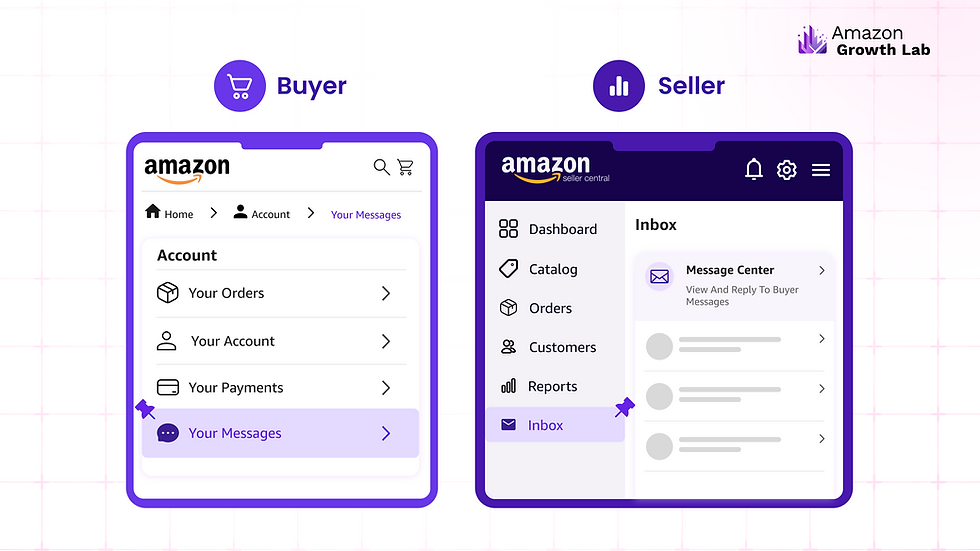
The Amazon Message Center is where you view and manage communication tied to your orders. Buyers find it under Your Account, then Your Messages. Sellers access buyer messages in Seller Central under the buyer-seller messaging inbox. Amazon expects sellers to respond within 24 hours, and messaging is limited to order-related topics, with marketing, external links, and review requests prohibited.
Whether you're a shopper trying to find a message about an order or a seller managing buyer communication at scale, the Message Center is where it all lives. This guide covers where to find it, how to use it, and the rules sellers need to follow to stay compliant.
Where to find the Amazon Message Center
If you're a buyer, your messages live under Your Account. Go to Your Account, then Your Messages, where you'll see communication with sellers, Amazon, and buyer-seller messaging tied to your orders. In the Amazon app, messages are reached through the menu rather than the main navigation, which is why many people struggle to locate them.
If you're a seller, buyer messages appear in Seller Central under the buyer-seller messaging inbox, separate from your personal Amazon account. This is where order inquiries, return questions, and buyer contact are organized so you can respond within Amazon's required window.
How buyer-seller messaging works
The Message Center exists to resolve order-related questions, and Amazon keeps it deliberately focused on that purpose. Buyers can ask about an order, a return, or a product detail. Sellers respond through the same thread, and the entire exchange stays inside Amazon rather than moving to email or another channel.
Amazon expects sellers to respond to buyer messages within 24 hours, including weekends and holidays. Response time is tracked, and consistently slow replies can affect your account health metrics, which is why many sellers use templates or dedicated support staff to keep response times low. If your inbox is outgrowing your team, you can hand buyer communication to a dedicated account team.
What sellers can and can't send
This is where sellers get into trouble, because Amazon has tightened buyer-seller messaging considerably.
Permitted messages are those necessary to complete or resolve an order: shipping questions, return coordination, or clarifying a product detail the buyer asked about. What's prohibited is broader than most sellers realize.
You cannot send marketing or promotional messages, include external links, request or incentivize positive reviews, or attempt to move the conversation off Amazon. Messages that stray from resolving the order can trigger warnings or account-level enforcement.
Buyers can also opt out of non-critical seller messages, and Amazon has increasingly limited proactive seller outreach. Critical messages tied to fulfilling an order still go through, but the era of using buyer-seller messaging as a marketing channel is over.

How messaging ties to account health
Buyer-seller messaging isn't a side feature. It feeds directly into the metrics Amazon uses to judge your account. Slow responses, buyer complaints about communication, and policy violations in messages all affect account standing, and sustained problems can put your selling privileges at risk.
Many messages you receive are fulfillment complaints, so have a plan to handle wrong-item complaints before they turn into A-to-z claims. Slow or off-policy replies can drag on your account standing, so learn how to keep your Account Health Rating in the green.
Buyer communication also intersects with reviews. When a buyer is unhappy, how you handle the message thread can shape whether that turns into a negative review, and it's worth understanding what you can and can't do about a negative review before it happens. When a buyer conversation turns into a case, you need to know how to escalate cases that stall in Seller Support.
Messaging discipline and compliance are part of broader account management on Amazon, where response times, policy adherence, and buyer experience compound into account health.

Compliance in messaging also connects to brand protection, since policy-violating communication is one of the avoidable ways sellers put an otherwise healthy account at risk.
The bottom line
The Amazon Message Center is where order communication lives, easy to find once you know buyers look under Your Messages and sellers work from the Seller Central inbox. Use it for order-related topics only, respond within 24 hours, keep marketing and external links out, and treat every thread as part of the account health picture Amazon is always measuring.

On-page FAQ section
Where is the Amazon Message Center?
For buyers, the Message Center is under Your Account, then Your Messages, where communication with sellers and Amazon is stored. In the Amazon app, it's reached through the menu. Sellers access buyer messages separately, inside Seller Central under the buyer-seller messaging inbox.
How quickly do sellers have to respond to Amazon messages?
Amazon expects sellers to respond to buyer messages within 24 hours, including weekends and holidays. Response time is tracked and factors into account health metrics, so consistently slow replies can hurt your standing. Many sellers use templates or support staff to keep response times low.
What are sellers not allowed to send through Amazon messaging?
Amazon prohibits marketing and promotional messages, external links, requests for positive reviews, and any attempt to move the conversation off Amazon. Messaging must stay focused on resolving the order. Violations can lead to warnings or account-level enforcement.
Can buyers stop receiving seller messages?
Yes. Buyers can opt out of non-critical seller messages, and Amazon has increasingly limited proactive seller outreach. Critical messages required to fulfill an order are still delivered, but sellers can no longer rely on buyer-seller messaging as a marketing channel.
Does Amazon messaging affect account health?
Yes. Response times, buyer complaints about communication, and policy violations in messages all feed into the metrics Amazon uses to judge your account. Sustained messaging problems can affect account standing and, in serious cases, put selling privileges at risk.


Comments